Your UPPCL smart prepaid meter is installed — you know how recharge and arrear deduction works. But new questions are popping up. Can they cut my power at midnight? What do those Hindi SMS messages mean? How do I recharge without a smartphone? This article covers everything beyond recharge and arrears.
Already covered separately: -
When Can UPPCL Cut My Smart Meter Power Supply?
UPPCL cannot disconnect you whenever it wants. There are protected time windows — even if your balance is zero.
No-Disconnect Zones — Times When Power Cannot Be Cut
| Protection Type | Rule |
|---|---|
| Happy Hours | No disconnection between 6:00 PM and 8:00 AM (entire night and early morning are safe) |
| Every Sunday | Full day — no disconnection |
| Second Saturday | Full day — no disconnection |
| Gazetted Holidays | Republic Day, Holi, Diwali, Eid, Independence Day, etc. — no disconnection |
| First 30 Days After Conversion | One-time grace period — supply will not be cut even if balance is zero or negative |
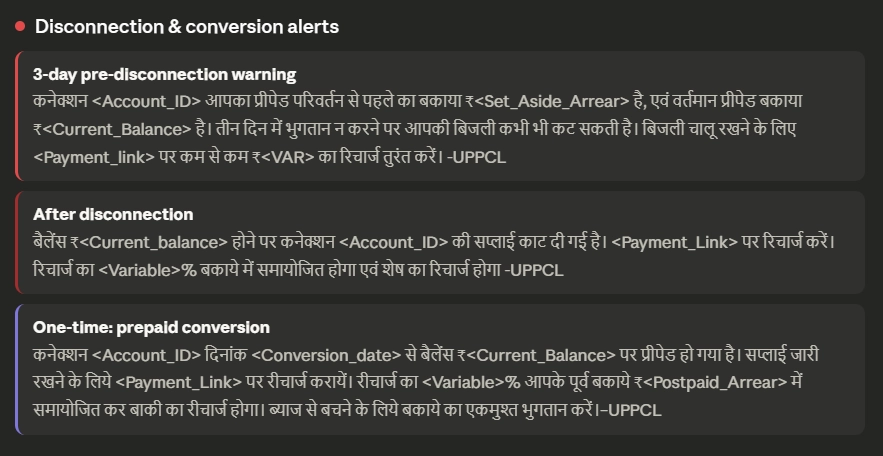
| 3-Day Emergency Credit | After balance hits zero, you still get 3 more days before disconnection can happen |
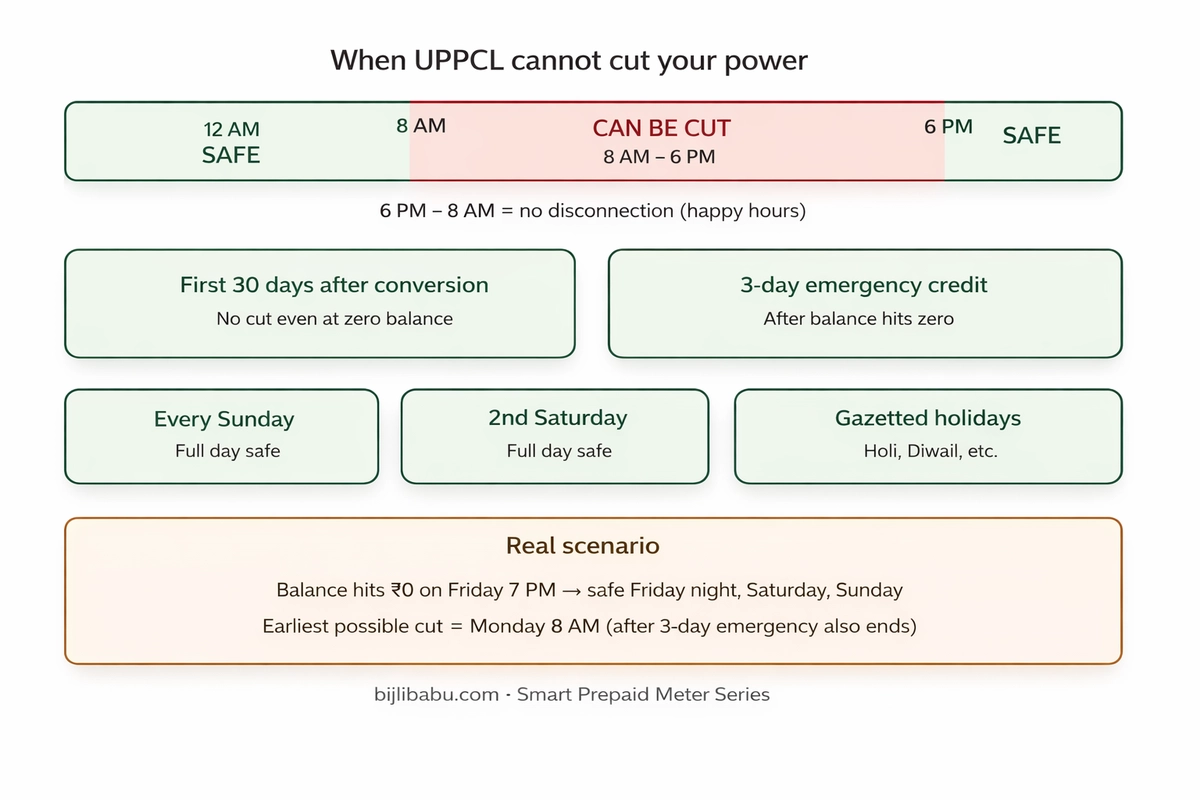
Practical meaning: If your balance hits zero on a Friday evening at 7 PM, UPPCL cannot cut you that night (happy hours), not on Saturday (if 2nd Saturday), not on Sunday. Your earliest risk is Monday after 8 AM — and only after the 3-day emergency credit has also expired.
One rule overrides everything: If you do not recharge within the grace + emergency period, disconnection will happen on the next eligible day. LPSC (Late Payment Surcharge — interest on unpaid amount) runs on every overdue day.
How Does Auto-Reconnect Work After Power Cut?
In the old system: office visit → queue → payment → wait for lineman. Smart meters eliminate all of this.
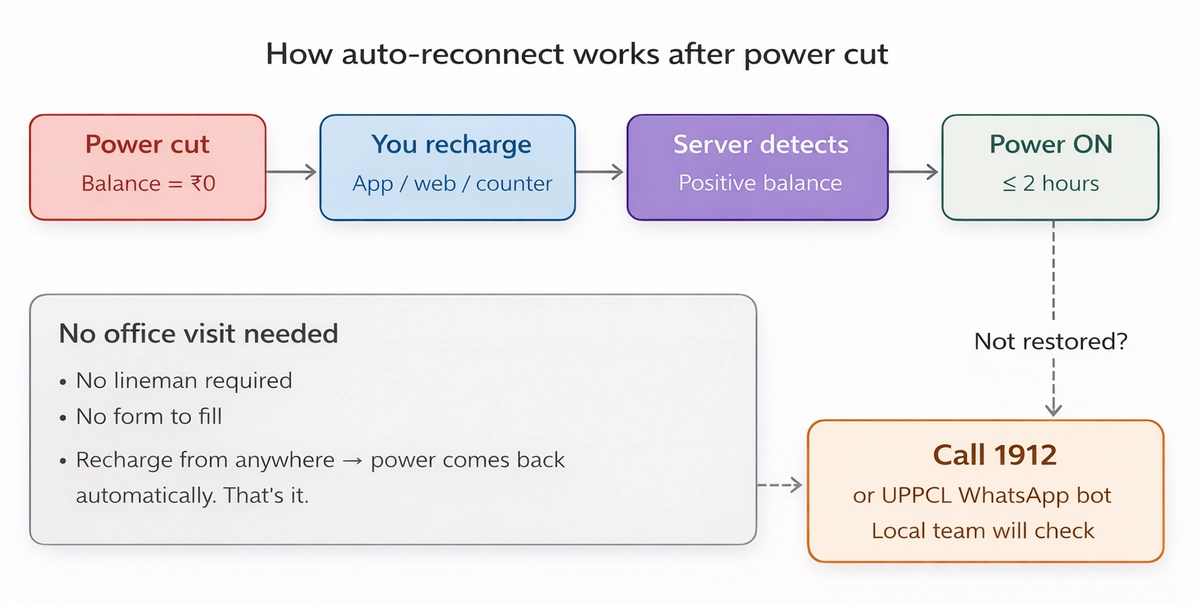
No form, no visit, no lineman. If power does not return within 2 hours, call 1912 or use the UPPCL WhatsApp chatbot.
What Is the 2% Prepaid Discount?
Once your meter becomes prepaid, you get 2% off on every unit's tariff rate — automatic, no application, no expiry.
A 200-unit/month household saves ~₹15/month (₹180/year). A 500-unit/month household saves ~₹40–50/month. The discount applies on the per-unit energy rate, not on fixed charges.
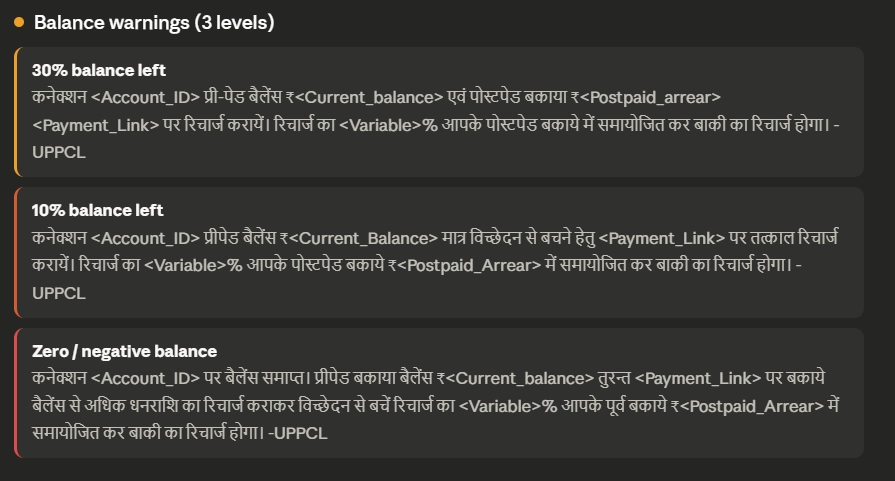
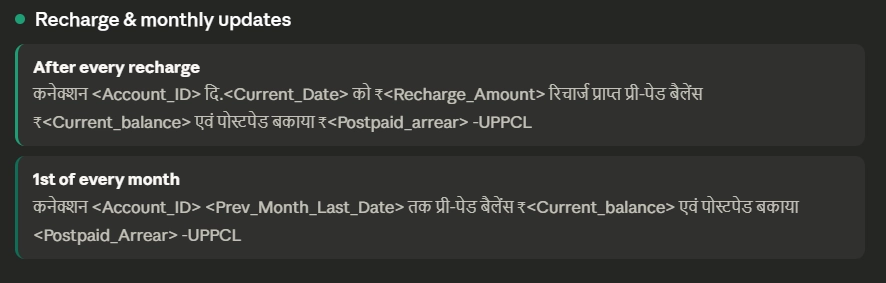
What SMS Alerts Does UPPCL Send?
UPPCL sends alerts at every critical stage — all in Hindi. Understanding them saves you from panic and power cuts.
Where Can I Recharge My Smart Prepaid Meter?
You are not limited to the UPPCL website. Multiple channels exist — at least one works without internet.
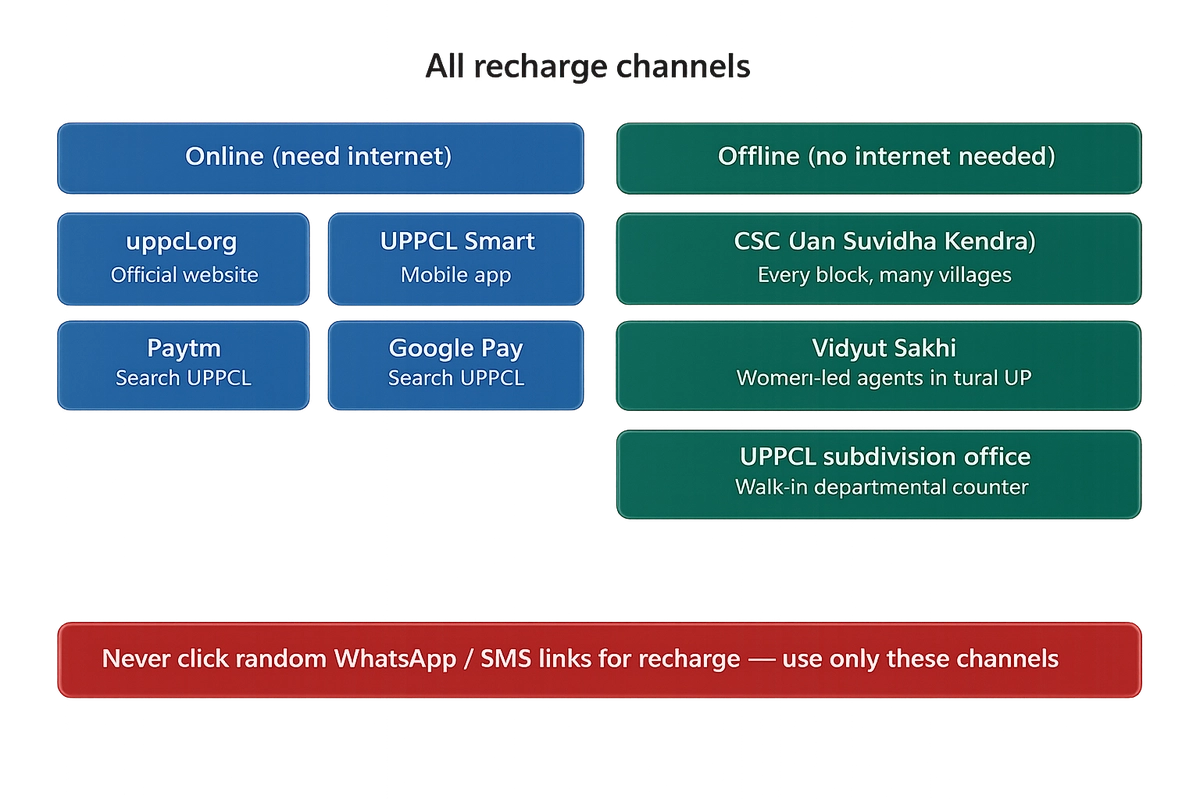
Cyber fraud warning: After meter installation, many consumers get fake WhatsApp messages with recharge links. Never click unknown links. Only use official channels listed above. Report fraud to 1912.
What Can the UPPCL Smart App Actually Do?
The app does much more than recharge:
- Real-time balance — updated throughout the day
- Hourly, daily, monthly consumption — identify which hours cost the most
- Recharge — UPI, Paytm, GPay, card, net banking
- Pay arrears separately — 100% goes to old dues, not split
- Past recharge history — all payments with dates
- Monthly bill statement — replaces paper bills
- Daily deduction details — exact ₹ deducted each day
- Complaint registration — power not restored, meter display faulty, etc.
Download: Search "UPPCL Smart" on Play Store / App Store. Free.
How to Check Balance Without a Smartphone?
- Meter display — LCD screen shows balance in ₹. Walk up and read it.
- SMS alerts — automatic at 30%, 10%, zero, and monthly on the 1st. Works on any basic phone.
- UPPCL website — enter Account ID on www.uppcl.org. No login needed.
- Subdivision office — ask at the counter with your Account ID.
Quick Notes: Solar-Ready & Paper Bills
Solar-ready: The smart meter supports net metering. If you install rooftop solar later (PM Surya Ghar scheme / UPNEDA), no meter change needed.
Paper bills stopped: Monthly statements now come via SMS. Download anytime from www.uppcl.org or the UPPCL Smart App. Change your habit — no bill arrives at the door anymore. Set a monthly recharge reminder.
Key Takeaways
- Power cannot be cut between 6 PM – 8 AM, on Sundays, 2nd Saturdays, gazetted holidays, first 30 days, or during 3-day emergency credit.
- After recharge, power restores within 2 hours. Call 1912 if it doesn't.
- 2% tariff discount — automatic, no application.
- SMS alerts at 30%, 10%, zero balance + after every recharge + monthly — all in Hindi.
- Recharge at CSC, Vidyut Sakhi, or UPPCL counter — no smartphone needed.
Frequently Asked Questions (FAQ)
Q: Can UPPCL disconnect my smart meter at midnight?
A: No. No disconnection between 6 PM and 8 AM (happy hours). Even at zero balance, supply is safe until 8 AM next morning — and only if it is not a Sunday, 2nd Saturday, gazetted holiday, or within your grace/emergency period.
Q: I recharged at night but power didn't come back. What do I do?
A: Wait up to 2 hours. If still off, call 1912 or message the UPPCL WhatsApp chatbot. A network glitch may need manual intervention.
Q: Someone sent me a WhatsApp link to recharge. Safe?
A: Most likely fraud. Only use www.uppcl.org, UPPCL Smart App, Paytm/GPay (search inside app), CSC, Vidyut Sakhi, or UPPCL counter.
Q: My phone number changed. How to update for SMS alerts?
A: Update on www.uppcl.org or visit your subdivision office with ID proof. All warnings go only to the registered OTP-verified number.
Q: Can I install solar panels later with this smart meter?
A: Yes. Net metering supported. No meter change needed.
Q: Paper bills stopped. Where is my monthly statement?
A: SMS, UPPCL Smart App, or www.uppcl.org — enter Account ID, no login needed.
Related Resources on BijliBabu.com
- Why Recharge Doesn't Clear Your Full Old Due — Understand the two payment buttons and which one clears 100% of arrears.
- Recharged but Still Low Balance? — Detailed breakdown of negative balance, security deposit adjustment, and LPSC.
- UPPCL Tariff Guide — Full slab-wise rate tables for all categories with the 2% prepaid discount factored in.